

Opt-Out Guide
How to Remove Yourself from Whitepages (2026 Guide)
Quick answer: Go to https://www.whitepages.com/suppression-requests, paste the URL of the listing you want removed, then answer the automated verification call and key in the four digit code shown on screen. Free, about 10 to 15 minutes. Listings usually come down within a few hours.
What is Whitepages?
Whitepages is one of the largest people search sites in the United States. Its free listings can show your full name, age, current and past addresses, phone numbers, and the names of relatives and associates. Anyone can look you up in seconds, no account needed. This matters for older adults in particular: a listing that pairs a person’s age with a phone number and home address is exactly the profile scammers use to pick targets for phone and mail fraud.
Before you start
Plan on 10 to 15 minutes per listing. The removal is free. No one should ever charge you for it.
You will need two things: the web address (URL) of the listing you want removed, and a phone that can answer an automated call. No email address or account is required. If there is more than one listing, you will repeat the process for each one.
Doing this for a parent? The verification call goes to whatever number you type in, so you can finish the whole request from your own phone without putting them on the line. The payoff lands on their phone and in their mailbox: fewer spam calls, less junk mail, and fewer scam texts getting through. Whitepages is only one stop, though. Families who do this by hand usually work through twenty or more of these sites, each with its own form and its own verification hoop.
How to opt out of Whitepages
- Go to www.whitepages.com and search the name, city, and state. Skip any “Whitepages Premium” results and click the free listing card that matches.
- Confirm the listing is the right person, then copy the full URL from your browser’s address bar. The correct URL contains the name, city, state, and a string of numbers at the end.
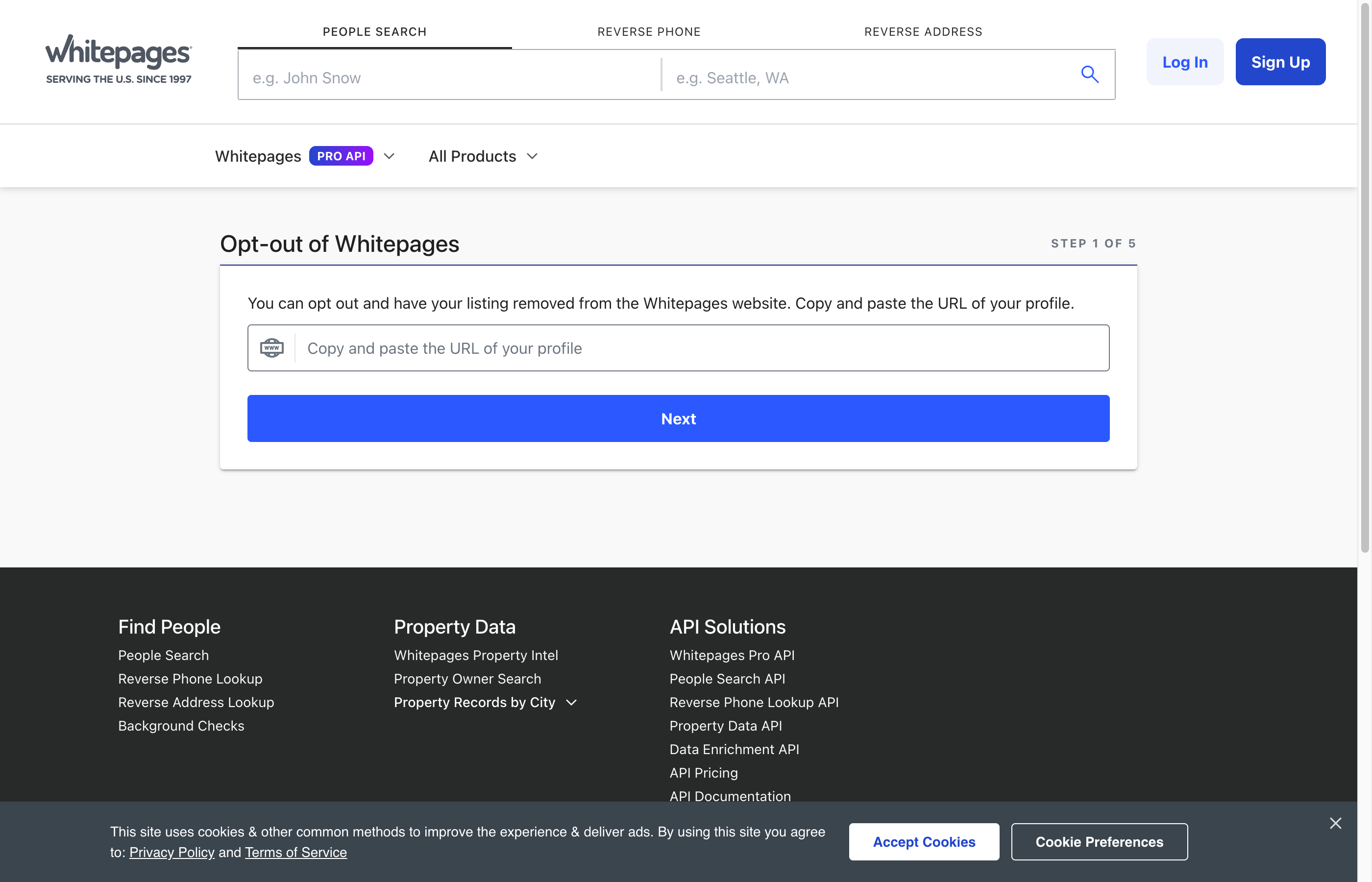
- Go to https://www.whitepages.com/suppression-requests.
- Paste the listing URL into the box and click “Next”.
- Confirm the listing is yours, choose a removal reason, and follow the prompts. Whitepages verifies requests with an automated phone call: enter the number where you can answer, and when the call comes, key in the code shown on your screen.
- Once the call verifies your code, the request is in. The listing comes down after verification, usually within a few hours.
One extra note: Whitepages also supplies the listings on its sister site 411.com, so this same request covers both.
How long it takes
Removal is fast once the phone verification succeeds. Most listings disappear within a few hours, and guides that track this broker report that many come down within the hour. If the listing is still visible after 24 hours, clear your browser cache and check again, then resubmit if needed.
Check back in a few months
Whitepages rebuilds its database from public records on a rolling basis. When a new record arrives, such as a phone account, a property record, or a change of address, a fresh listing can appear even after a successful removal. Whitepages says it tries to keep suppressed records suppressed, but new listings with slightly different details slip through. Search the name again every 90 days and repeat the steps above for anything new. If you are working from a hand-built list of brokers, that means running the whole routine again each quarter, on this site and every other one. KinKeeper keeps supported removal requests and repeat checks organized in one place.
Frequently asked questions
Does it cost anything to remove my information from Whitepages?
No. The suppression request tool is free. You never need to pay a data broker to remove your own listing, and any site that asks for payment to do this should be treated with suspicion.
Why does Whitepages call my phone during the opt out?
The phone call is how Whitepages confirms a real person made the request. An automated system calls the number you enter and asks you to key in a four digit code shown on your screen. The call comes within seconds, so have the phone in hand. It goes to whichever number you entered, which means a son or daughter handling this for a parent can answer on their own phone.
Does opting out of Whitepages also remove me from 411.com?
Yes. 411.com runs on Whitepages data, so a suppression request submitted through Whitepages covers your 411.com listing too.
More opt-out guides

Privacy protection
Use the guide now. Keep status in one view.
Use the free guide, or keep supported opt-outs, status, and repeat checks together with KinKeeper Privacy.
Waitlist updates · No payment required · Unsubscribe anytime