

Quick answer: Go to https://www.192.com/c01/new-request/, enter the person’s name, their full UK postcode, and your email, then click the confirmation link 192.com sends you. Nothing is processed until that link is clicked. Free, about 5 minutes per address. 192.com says removals usually take effect within 24 hours, but this is a per-address request process, so someone with several past UK addresses will be filing several forms.
What is 192.com?
Skip this one unless your loved one has lived in the United Kingdom. If they have, even decades ago, keep reading. 192.com is a British people search site that publishes names, addresses, and household details drawn from the UK’s open electoral roll (the version of the voter list that can legally be sold), Companies House company director records, and old phone directories. A whole UK chapter of someone’s life can sit there in plain view. Data like this gets bought and resold, and it ends up powering the phone and mail lists that steer scam attempts toward older people on both sides of the Atlantic.
Before you start
The removal, which 192.com calls its C01 process, is free. Paying someone to file this single form makes no sense.
You will need the name as it appears on the site, the full postcode for each UK address involved (a postcode looks like SW1A 1AA and covers only a handful of homes), and an email address you control. If you cannot find the postcode, 192.com asks you to email feedback@192.com with whatever details you have about the record.
Doing this for a parent? This is one of the friendlier brokers on that question. The form itself says it may be completed for yourself or members of your immediate family, and it takes up to five extra people at the same address, so one submission can cover Mum, Dad, and anyone else in the household. Getting the UK listings down means fewer lists carrying their name, and over time that means fewer odd calls and fewer official-looking letters built to fool them.
After weeks of American opt-out forms, each with its own trick step, the British entry comes as a small mercy: it is short, and the only grind is repeating it for every address your parent ever lived at.
How to opt out of 192.com
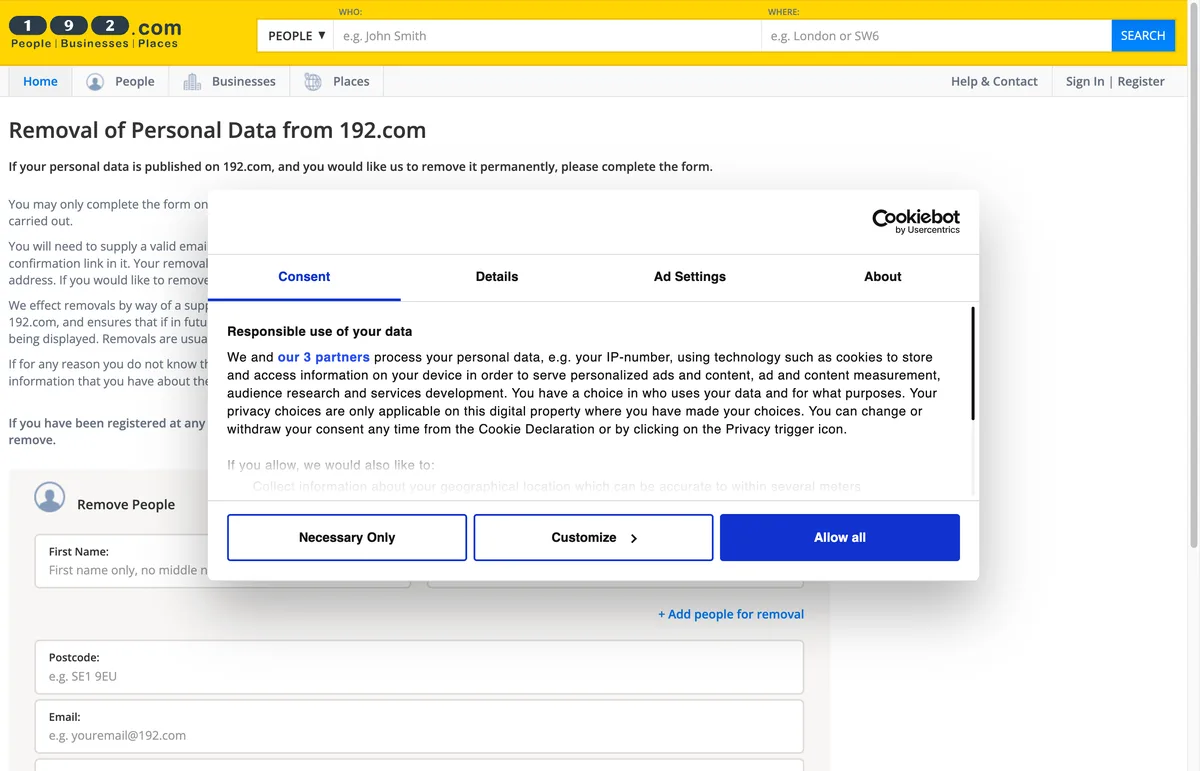
- Go to https://www.192.com/c01/new-request/. The page that opens is titled “Removal of Personal Data from 192.com.” We walked the live form in July 2026, and everything below matches what it shows.
- Enter the person’s first name and surname. Use ”+ Add people for removal” to include up to five more people living at the same address.
- Enter the full postcode of the address whose records you want removed.
- Add your email address (the phone field is optional), answer the small addition sum that proves you are a real person, and submit the form.
- Open the confirmation email from 192.com and click the link inside. The removal is not processed until this happens.
- File a fresh form for each previous UK address and for any other surname the person has used, since each name and address pairing is a separate record.
How long it takes
The C01 page says removals are usually effected within 24 hours of a confirmed request, and 192.com’s help pages allow up to 48. The removal works through a suppression file: the name and postcode are added to a block list, so when new data files arrive from suppliers carrying those same details, they are kept off the site automatically.
Check back in a few months
That suppression file protects the exact name and postcode you filed, and nothing beyond it. A move within the UK, a name change after marriage, or an address you forgot about can each surface as a brand new record the old request never touched. Put a reminder in the calendar to search the name on 192.com every 90 days or so. KinKeeper keeps supported removal requests and repeat checks organized in one place.
Frequently asked questions
My mother lives in the UK and I am in the US. Am I allowed to file this for her?
Yes. The 192.com removal form may be completed for yourself or members of your immediate family, so an adult child qualifies. Use an email address you control, because the request only goes through after the confirmation link is clicked.
Do we need to post ID documents to 192.com?
Not for the online form. It asks for a name, a postcode, and an email, plus a simple sum to prove you are human. No passport copies and no utility bills.
Once a record is removed from 192.com, can it come back?
The exact name and postcode you filed should stay down, because 192.com adds them to a suppression file that screens future data deliveries. A move to a new address creates a new record, though, and that one needs its own form.

Privacy protection
Use the guide now. Keep status in one view.
Use the free guide, or keep supported opt-outs, status, and repeat checks together with KinKeeper Privacy.
Waitlist updates · No payment required · Unsubscribe anytime