

Quick answer: Go to https://www.addresssearch.com/remove-info.php, enter the name, email, and full street address shown on the listing, then click “Remove Yourself” and watch for the on-screen confirmation. Free, about 5 minutes. Listings usually come down within 24 to 48 hours.
What is AddressSearch?
Feed AddressSearch a name and it hands back a home address, and often a phone number, email address, and links to social media profiles along with it. The company describes itself as a public records search engine with access to more than a billion records gathered from government agencies, businesses, and other sources. For a retiree, a published phone number sitting beside a street address is an open invitation to every crew working a phone bank, since directory pages exactly like this one are where those dial lists get built.
Before you start
Removal costs nothing, and anyone telling you otherwise is selling something. The form asks for a name, an email address, and the street address on the listing, so gather those first.
About that email: use a throwaway or secondary account if you can. Optery, which tracks hundreds of brokers, cautions that some of these companies fold submitted contact details into their own databases, which is a rotten reward for asking to be left alone.
Doing this for a parent? Nothing in this form checks who is submitting it. You can look up their listing, type in their details, and send the request from your own kitchen table without them lifting a finger. The form’s own terms allow requests for information that is “either yours or a dependent of yours,” so the site itself expects family submissions. What they will notice is a quieter phone line and a thinner stack of junk mail.
How to opt out of AddressSearch
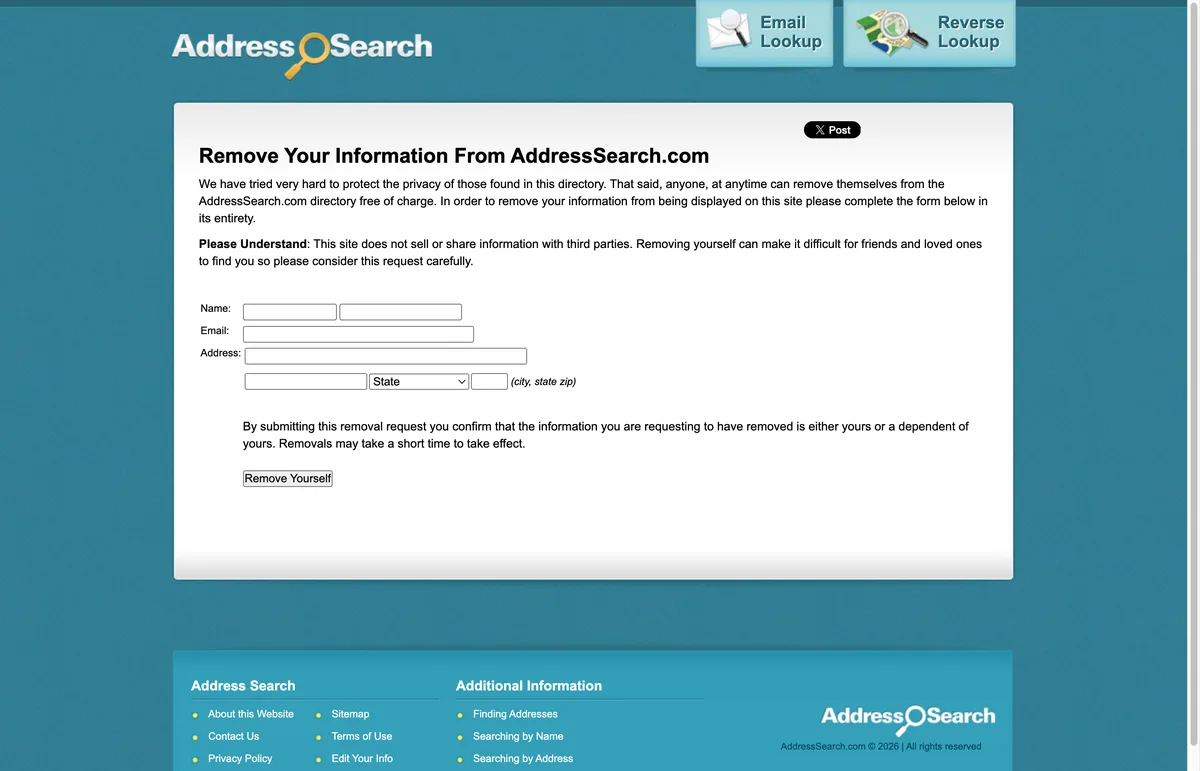
- Search for the listing at https://www.addresssearch.com first, so you can enter the details the same way the site displays them.
- Go to the removal page at https://www.addresssearch.com/remove-info.php. The page is headed “Remove Your Information From AddressSearch.com” and states that removal is free.
- Fill in the form: first and last name in the two name boxes, the email address, and the street address along with city, state, and ZIP.
- Click the “Remove Yourself” button. By submitting, you are confirming the information is “either yours or a dependent of yours,” in the page’s own words.
- An on-screen message should confirm the request was received. There is no confirmation email to click, so a screenshot of that message is the only receipt you get.
How long it takes
The site itself only says removals “may take a short time to take effect,” with no firmer promise than that. Third-party guides most often report 24 to 48 hours, and a few warn that stubborn listings can linger for several weeks. Check after two days, then again after a month if the listing is still hanging around.
Check back in a few months
Somewhere around the tenth broker form, this whole project starts to feel like shoveling the driveway while the snow is still falling, and this site is no exception. A removed listing can be rebuilt whenever a new batch of public records rolls in, and the rebuilt version owes nothing to your earlier request. Re-run the search every 90 days and file the form again when something reappears. KinKeeper keeps supported removal requests and repeat checks organized in one place.
Frequently asked questions
Do I have to create an account or pay AddressSearch to be removed?
No. The remove-info form is free and open to anyone. If a people search site ever asks for payment to delete your own listing, close the tab. Legitimate opt outs never cost money.
Which email address should I put in the AddressSearch form?
A secondary or disposable address if you have one. Privacy researchers have long warned that some brokers keep the contact details people submit, so there is no reason to hand over your main inbox.
I removed my dad's listing and it showed up again. What happened?
The site rebuilt it from newer public records. That is normal, and it does not mean the first request failed. Submit the form again with the details from the new listing, and make re-checking every three months part of the routine.
More opt-out guides

Privacy protection
Use the guide now. Keep status in one view.
Use the free guide, or keep supported opt-outs, status, and repeat checks together with KinKeeper Privacy.
Waitlist updates · No payment required · Unsubscribe anytime