

Quick answer: Go to https://www.archives.com/optout, fill in the name and address you want hidden from living person search results, agree to the Opt-Out Policy, and click Submit. Free, about 10 minutes. This is a request form with a manual review behind it, so Archives.com quotes up to 30 days, though it often finishes sooner. You get an email once the records are suppressed.
What is Archives.com?
Archives.com sells subscriptions to a genealogy database of more than 11 billion historical records, and it is owned by Ancestry, the biggest name in family history research. Most of what it holds concerns people long gone. The trouble is its living person search, which can pair a living person’s name with addresses and phone numbers. Listings like that feed the call lists and mail lists that flood older people with spam and scam attempts, so this site belongs on your removal list even though it looks like a harmless hobby site.
Before you start
The opt-out is free. Never pay any broker to remove your own information, on this site or any other.
Have ready: the full name as it appears on the site, the current address, any past addresses you want covered, a phone number if one is listed, and an email address where the confirmation will land. It also helps to note exactly how you found the listing, because the form asks you to describe the search you ran. That little essay question is this site’s particular quirk. By broker nine or ten of the twenty-some a family works through, you learn that every site has one.
Doing this for a parent? You can. The Opt-Out Policy accepts requests from a family member of the person listed, so no power of attorney is needed. Archives.com may ask for proof of identity, and it reviews requests by hand. The effort is worth it. Every listing you pull down means fewer spam calls to their phone, less junk mail, and fewer scam letters that ever reach them.
How to opt out of Archives.com
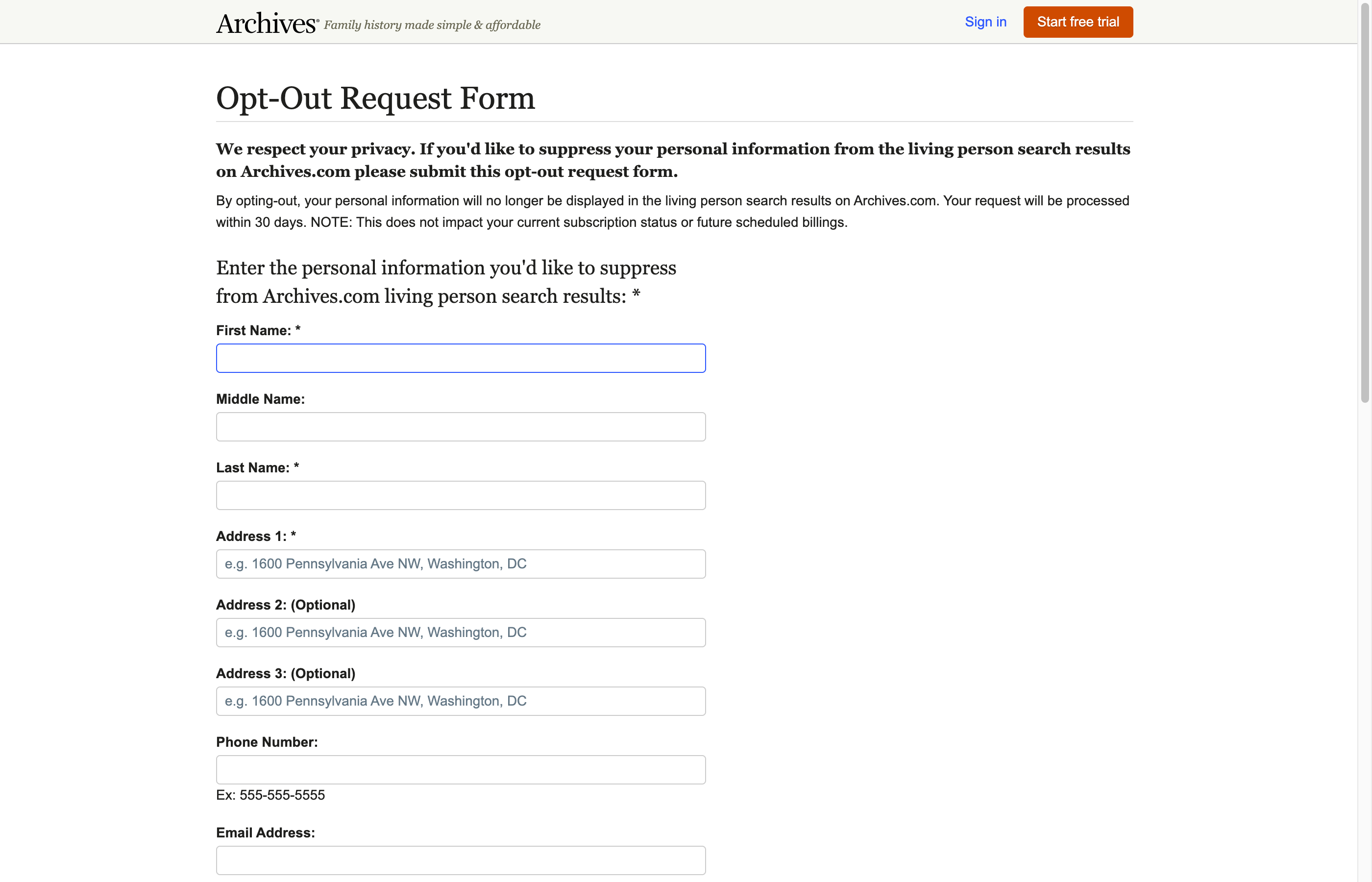
- Go to https://www.archives.com/optout. (The old link, archives.com/?_act=Optout, now just redirects to the homepage.)
- In the section labeled “Enter the personal information you’d like to suppress,” type the person’s first, middle, and last name, their address, and a phone number or email if one appears on the site.
- In “Please tell us who you are,” enter your own name and email, or tick “Same as above” if you are removing yourself. The confirmation email goes to this address.
- In the required “Additional Information” box, describe the records you saw and the search terms that surfaced them. More detail means a faster match.
- Check “Yes, I agree to the Opt-Out Policy” and click Submit.
- Watch for a confirmation email saying the records have been suppressed.
How long it takes
Archives.com states that requests are processed within 30 days, with a confirmation email once the suppression is done. Removal services that track this site have seen it move faster in practice, sometimes within a week or two, sometimes closer to three. Requests are approved manually, and an incomplete form is the most common cause of delay.
Check back in a few months
Two things can bring a listing back. New records flow into the database constantly, and a fresh record may not be covered by your old request. On top of that, the site’s own policy says an opt-out lasts five years, so even a successful request is not forever. Search the name again about every 90 days and refile if anything reappears. KinKeeper keeps supported removal requests and repeat checks organized in one place.
Frequently asked questions
Can I opt my mother or father out of Archives.com?
Yes. The Archives.com Opt-Out Policy accepts requests from a family member of the person listed, so an adult child can file directly. The site may ask you to verify who you are, and every request gets a manual review before approval.
Does opting out erase the records Archives.com holds?
No. It hides the information from the living person search results on Archives.com only. The underlying public records still exist elsewhere, and records about deceased ancestors are not affected at all.
Is the Archives.com opt-out permanent?
No, and this surprises people. The site's policy sets the opt-out term at five years. Between that expiration and new records arriving, it pays to search the name again every few months.
More opt-out guides

Privacy protection
Use the guide now. Keep status in one view.
Use the free guide, or keep supported opt-outs, status, and repeat checks together with KinKeeper Privacy.
Waitlist updates · No payment required · Unsubscribe anytime